问题背景
activiti explorer 5.22自带的例子,导入到activiti explorer发现报错,提示没有bpmn di信息:

查资料得知,BPMN DI信息用于描述流程中每一个组件的XY坐标、宽度、高度。activiti官方的例子只用于代码测试,因此省去了bpmn di信息。
BpmnAutoLayout 转换
activiti提供了activiti-bpmn-layout模块,可以自动生成bpmndi信息。
pom引入
<dependency>
    <groupId>org.activiti</groupId>
    <artifactId>activiti-bpmn-layout</artifactId>
    <version>5.22.0</version>
</dependency>
读取bpmn xml文件,然后转换为BpmnModel,再用BpmnAutoLayout自动生成bpmndi信息。代码如下:
@Test
public void testAutoLayout() {
    InputStream in = TestActiviti.class.getResourceAsStream("/VacationRequest.bpmn20.xml");
    BpmnXMLConverter converter = new BpmnXMLConverter();
    XMLInputFactory factory = XMLInputFactory.newInstance();
    XMLStreamReader reader = null;  //createXmlStreamReader
    try {
        reader = factory.createXMLStreamReader(in);
        // 将xml文件转换成BpmnModel
        BpmnModel bpmnModel = converter.convertToBpmnModel(reader);
        // 自动生成bpmndi信息
        new BpmnAutoLayout(bpmnModel).execute();
        Deployment deployment = repositoryService.createDeployment()
                .addBpmnModel("dynamic-model.bpmn", bpmnModel).name("Dynamic process deployment")
                .deploy();
        InputStream in2 = repositoryService.getResourceAsStream(deployment.getId(), "dynamic-model.bpmn");
        FileCopyUtils.copy(in2, new FileOutputStream(new File("/VacationRequest2222.bpmn20.xml")));
    } catch (XMLStreamException | IOException e) {
        e.printStackTrace();
    } finally {
        if (reader != null) {
            try {
                reader.close();
            } catch (XMLStreamException e) {
                e.printStackTrace();
            }
        }
    }
}
打开生成后的文件,多了<bpmndi:BPMNDiagram>节点:
  <bpmndi:BPMNDiagram id="BPMNDiagram_vacationRequest">
    <bpmndi:BPMNPlane bpmnElement="vacationRequest" id="BPMNPlane_vacationRequest">
      <bpmndi:BPMNShape bpmnElement="request" id="BPMNShape_request">
        <omgdc:Bounds height="30.0" width="30.0" x="0.0" y="178.0"></omgdc:Bounds>
      </bpmndi:BPMNShape>
      <!-- more codes -->
      <bpmndi:BPMNEdge bpmnElement="flow2" id="BPMNEdge_flow2">
        <omgdi:waypoint x="180.0" y="180.5"></omgdi:waypoint>
        <omgdi:waypoint x="192.0" y="180.5"></omgdi:waypoint>
        <omgdi:waypoint x="192.0" y="134.0"></omgdi:waypoint>
        <omgdi:waypoint x="230.0" y="134.0"></omgdi:waypoint>
      </bpmndi:BPMNEdge>
      <!-- more codes -->
  </bpmndi:BPMNDiagram>
这次可以在activiti explorer打开了,自动排版效果不咋的。
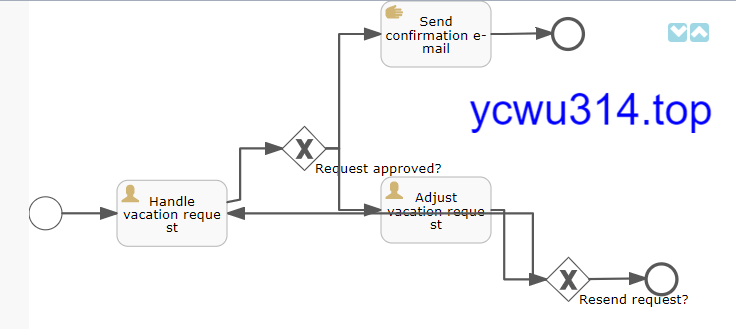
activiti 6
手头上有activiti app(activiti 6 官方自带的ui应用)环境,于是最初的无bpmndi信息文件导进去试试,发现可以打开,效果和上图activiti explorer一样。