聊聊CAS登录过程的302重定向对web请求的影响。
问题背景
CAS协议登录流程涉及到302重定向:
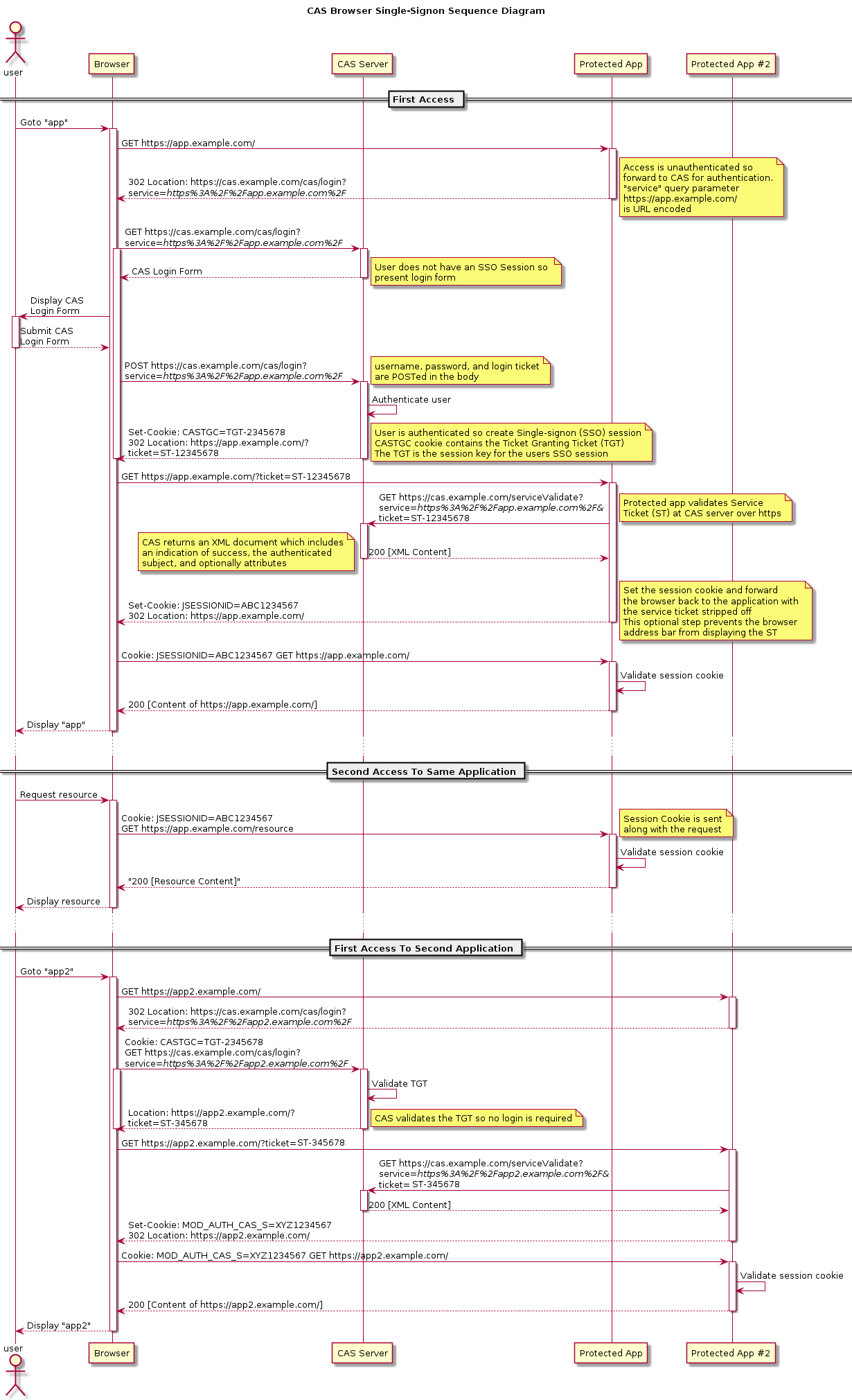
未登录状态页面直接使用XMLHttpRequest(即ajax)发送请求,被filter拦截,app服务器返回302重定向到登录页面。 但是ajax并没有正常处理302,没有跳到登录页面。
问题分析
当服务器将302响应发给浏览器时,浏览器并不是直接进行ajax回调处理,而是先执行302重定向——从Response Headers中读取Location信息,然后向Location中的Url发出请求,在收到这个请求的响应后才会进行ajax回调处理。 大致流程如下:
ajax -> browser -> server -> 302 -> browser(redirect) -> server -> browser -> ajax callback
如果302返回的重定向URL在服务器上没有相应的处理程序,那么在ajax回调函数中得到的是404状态码。 如果存在对应的URL,得到的状态码就是200。
所以ajax请求得不到302响应码。
解决xhr web重定向问题的几种思路:
- 前后端不使用302,自定义协议告诉前端要发生重定向
- 在重定向页面添加标记,xhr在返回页面提取标记
- 不使用xhr,使用fetch api
方案1: 自定义协议
自定义协议很简单:
- 302换成401、403。xhr返回判断是否error。
- 302换成200,在json中返回跳转信息。
ajax增加全局setup,处理自定义协议即可。
虽然简单,但是对原生的CAS协议有入侵,抓包分析对不上。
实现有2个选项:
- 在cas client
- 在网关处理
这里使用cas-client-autoconfig-support接入cas。
- 引入依赖
        <dependency>
            <groupId>net.unicon.cas</groupId>
            <artifactId>cas-client-autoconfig-support</artifactId>
            <version>2.3.0-GA</version>
        </dependency>

        <dependency>
            <groupId>org.jasig.cas.client</groupId>
            <artifactId>cas-client-core</artifactId>
            <version>3.5.0</version>
        </dependency>
application.yml增加配置
cas:
  server-url-prefix: http://xxx/cas
  server-login-url: http://xxx/cas/login
  client-host-url: http://xxxx
  validation-type: cas
启动类增加
@EnableCasClient
- 自定义AuthenticationRedirectStrategy,从而处理xhr请求
public class CopeWithXhrRedirectStrategy implements AuthenticationRedirectStrategy {

    @Override
    public void redirect(HttpServletRequest request, HttpServletResponse response, String potentialRedirectUrl) throws IOException {
        String headerRequestedWith = request.getHeader("X-Requested-With");
        // ajax请求
        if (!StringUtils.isEmpty(headerRequestedWith)) {
            response.setStatus(200);
            response.setContentType("text/plain");
            try {
                response.getWriter().write(customRedirectUrl(potentialRedirectUrl));
            } catch (IOException e) {
            }
        } else {
            response.sendRedirect(potentialRedirectUrl);
        }
    }

    private String customRedirectUrl(String redirectUrl) {
        return "{\"status\":403,\"redirectURL\":\"" + redirectUrl + "\"}";
    }
}
- 覆盖CasClientConfigurerAdapter配置
@Configuration
public class CasConfiguration extends CasClientConfigurerAdapter {

    @Override
    public void configureAuthenticationFilter(FilterRegistrationBean authenticationFilter) {
        // filter参数的注入方式
        super.configureAuthenticationFilter(authenticationFilter);
        authenticationFilter.getInitParameters().put("authenticationRedirectStrategyClass","xxxx.CopeWithXhrRedirectStrategy");

    }
}
相关入口在AuthenticationFilter:
public class AuthenticationFilter extends AbstractCasFilter {

    protected void initInternal(final FilterConfig filterConfig) throws ServletException {
        if (!isIgnoreInitConfiguration()) {
            // more codes

            final Class<? extends AuthenticationRedirectStrategy> authenticationRedirectStrategyClass = getClass(ConfigurationKeys.AUTHENTICATION_REDIRECT_STRATEGY_CLASS);

            if (authenticationRedirectStrategyClass != null) {
                this.authenticationRedirectStrategy = ReflectUtils.newInstance(authenticationRedirectStrategyClass);
            }
        }
    }

}
-
在前端增加全局的ajax setup,处理自定义协议。
-
springboot 2.x securtiy优先级比cas filter高,因此会拦截掉请求。 这里改为全部放行,由cas client拦截。
@Configuration
public class BeanConfig extends WebSecurityConfigurerAdapter {

    @Override
    protected void configure(HttpSecurity http) throws Exception {
        http.authorizeRequests()
                .anyRequest().permitAll().and().logout().permitAll();//配置不需要登录验证
    }

}
方案2: 增加响应头
xhr能获取浏览器302重定向之后的响应码,这个没卵用。 但是xhr还能获取这个新页面的response header。 这里就可以做手脚。在跳转页面增加返回header标记。
具体的流程:
- cas client拦截到未登录请求,且为ajax请求,则在redirect to cas server的url增加标记,比如
x-from-ajax=1,再回复浏览器。 - 浏览器发现是302,重定向到cas server(这里还要考虑cors问题,此处不展开)。
- cas server解析了
x-from-ajax=1,再在页面响应中增加头部X-LOGIN-PAGE-REDIRECT,值为当前url。 - ajax拿到浏览器加载完新页面的响应结果,status是200。
然后使用
xhr.getResponseHeader("X-LOGIN-PAGE-REDIRECT")获取真实的重定向url。 - ajax处理后跳转到目标url
jquery框架可以全局设置
$(document).ajaxComplete(function(e, xhr, settings){
    if(xhr.status === 200){
        var loginPageRedirectHeader = xhr.getResponseHeader("X-LOGIN-PAGE-REDIRECT");
        if(loginPageRedirectHeader && loginPageRedirectHeader !== ""){
            // 如果是iframe,用top
            window.location.replace(loginPageRedirectHeader);
        }
    }
});
这个方案基本保持了CAS协议。
cas client对于ajax请求的重定向url增加标记。
判断ajax请求根据x-requested-with请求头即可。
x-requested-with XMLHttpRequest
如果使用标准cas client接入,那么client直接返回了。 这里有2个选择:
- 自行修改cas client,加入上面的逻辑。
- 在网关层处理
cas server返回增加header标记,也是2种方法解决:
- 修改cas server源码
- 在网关层处理
方案3: 使用fetch替换xhr
fetch是浏览器提供的api,功能强大,可以替代XMLHttpRequest。
function postData(url, data) {
  // Default options are marked with *
  return fetch(url, {
    body: JSON.stringify(data), // must match 'Content-Type' header
    cache: 'no-cache', // *default, no-cache, reload, force-cache, only-if-cached
    credentials: 'same-origin', // include, same-origin, *omit
    headers: {
      'user-agent': 'Mozilla/4.0 MDN Example',
      'content-type': 'application/json'
    },
    method: 'POST', // *GET, POST, PUT, DELETE, etc.
    mode: 'cors', // no-cors, cors, *same-origin
    redirect: 'follow', // manual, *follow, error
    referrer: 'no-referrer', // *client, no-referrer
  })
  .then(response => response.json()) // parses response to JSON
}
fetch的options配置里有一条叫做redirect
- follow 默认,跟随跳转
- error 阻止并抛出异常
- manual 阻止重定向
只需要在cas server配置好cors策略,则fetch可以顺利完成302重定向。
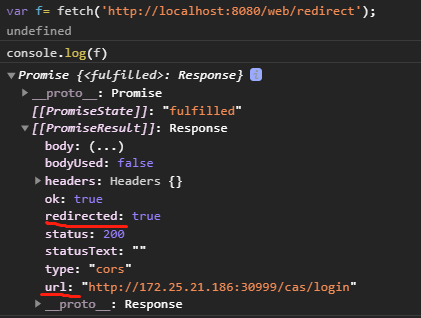
使用fetch的响应结构redirected和url就可以方便在web端控制。
fetch问题在于兼容性。IE全家桶不支持。另外,大量使用xhr类库也不兼容。