stream的close方法
配置了sonarcube规则扫描代码,其中一个资源关闭问题报错:
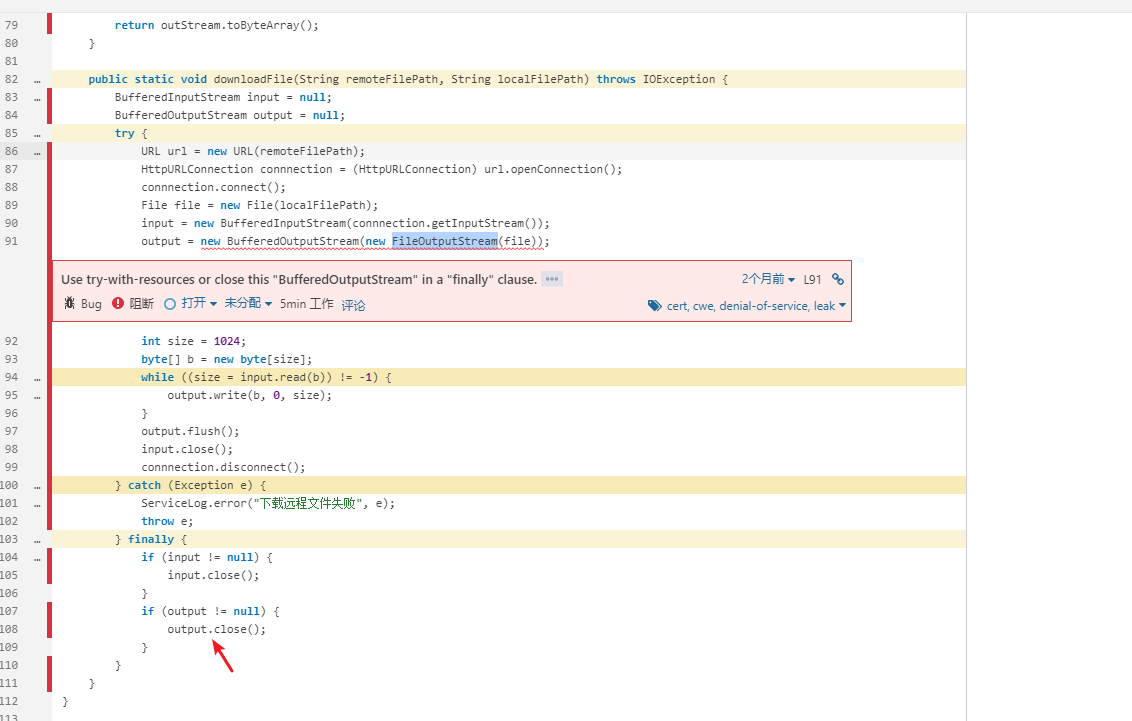
因为传入的FileOutputStream资源是匿名,没有手动释放;这里只释放了BufferedOutputStream的资源,导致sonar检查报错。
不过看了下java 8的源码,BufferedOutputStream的close方法来自FilterOutputStream:
public class FilterOutputStream extends OutputStream {
    /**
     * The underlying output stream to be filtered.
     */
    protected OutputStream out;

    /**
     * Flushes this output stream and forces any buffered output bytes
     * to be written out to the stream.
     * <p>
     * The <code>flush</code> method of <code>FilterOutputStream</code>
     * calls the <code>flush</code> method of its underlying output stream.
     *
     * @exception  IOException  if an I/O error occurs.
     * @see        java.io.FilterOutputStream#out
     */
    public void flush() throws IOException {
        out.flush();
    }

    /**
     * Closes this output stream and releases any system resources
     * associated with the stream.
     * <p>
     * The <code>close</code> method of <code>FilterOutputStream</code>
     * calls its <code>flush</code> method, and then calls the
     * <code>close</code> method of its underlying output stream.
     *
     * @exception  IOException  if an I/O error occurs.
     * @see        java.io.FilterOutputStream#flush()
     * @see        java.io.FilterOutputStream#out
     */
    @SuppressWarnings("try")
    public void close() throws IOException {
        // java 7 try with resource的写法
        // 这里用了一个临时变量指向底层的流,保证底层资源被释放
        try (OutputStream ostream = out) {
            flush();
        }
    }
close()会强制刷新流。在写法上,使用了java7的try-with-resource特性,因此会释放底层的流。
但是目前的sonar规则没有识别出来。
so,还是手动改下应用代码写法。
lombok的cleanup注解
经同事提醒,lombok提供了@Cleanup,自动关闭资源,简化代码。
来自官网的例子:
public class CleanupExample {
  public static void main(String[] args) throws IOException {
    @Cleanup InputStream in = new FileInputStream(args[0]);
    @Cleanup OutputStream out = new FileOutputStream(args[1]);
    byte[] b = new byte[10000];
    while (true) {
      int r = in.read(b);
      if (r == -1) break;
      out.write(b, 0, r);
    }
  }
}
对比以前的写法,简洁多了:
public class CleanupExample {
  public static void main(String[] args) throws IOException {
    InputStream in = new FileInputStream(args[0]);
    try {
      OutputStream out = new FileOutputStream(args[1]);
      try {
        byte[] b = new byte[10000];
        while (true) {
          int r = in.read(b);
          if (r == -1) break;
          out.write(b, 0, r);
        }
      } finally {
        if (out != null) {
          out.close();
        }
      }
    } finally {
      if (in != null) {
        in.close();
      }
    }
  }
}
@Cleanup会自动调用对象的close方法。可以指定其他资源释放的方法:
@Cleanup("dispose") org.eclipse.swt.widgets.CoolBar bar = new CoolBar(parent, 0);