A Kubernetes Deployment managed ReplicaSet. Each one represents a different version of the deployed application. Each ReplicaSet manages a set of identically versioned Pods.
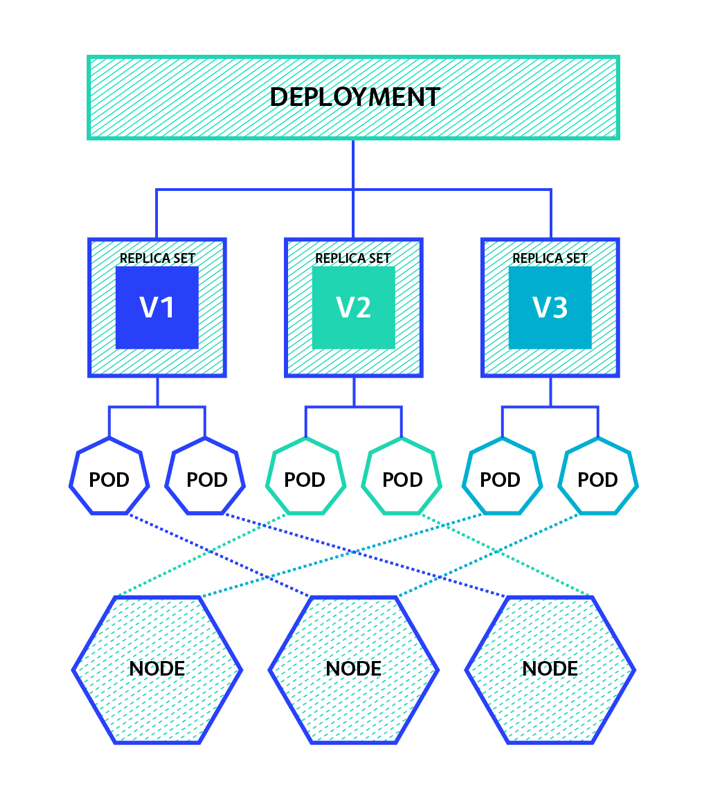
(图片来源:www.weave.works)
小实验
通过一个实验来加深理解。tomcat.yml配置如下:
apiVersion: apps/v1
kind: Deployment
metadata:
  name: mytomcat
spec:
  selector:
    matchLabels:
      app: tomcat
  replicas: 2
  template:
    metadata:
      labels:
        app: tomcat
    spec:
      containers:
      - name: tomcat
        image: tomcat
        ports:
        - containerPort: 8080
然后执行kubectl create -f tomcat.yml。
Pod
Pod是kubernetes中最基本的应用执行单元。代表一个在k8s集群运行的进程。 当Pod被创建后,都会被Kubernetes调度到集群的Node上。 通常不会直接使用Pod,而是通过controller操作。
# kubectl get pod
NAME                        READY   STATUS    RESTARTS   AGE
mytomcat-78c89857d6-428gg   1/1     Running   0          7h54m
mytomcat-78c89857d6-rxx8v   1/1     Running   0          7h38m


# kubectl describe pod mytomcat-78c89857d6-428gg
Name:         mytomcat-78c89857d6-428gg
Namespace:    default
Priority:     0
Node:         izwz9h8m2chowowqckbcy0z/172.18.151.35
Start Time:   Mon, 30 Sep 2019 13:32:05 +0800
Labels:       app=tomcat
              pod-template-hash=78c89857d6
Annotations:  <none>
Status:       Running
IP:           10.1.1.12
IPs:
  IP:           10.1.1.12
Controlled By:  ReplicaSet/mytomcat-78c89857d6
Controlled By字段表明由ReplicaSet管理pod。
另外,Deployment controller会自动为Pod添加pod-template-hash label。这样做的目的是防止Deployment的子ReplicaSet的pod名字重复。
ReplicaSet
A ReplicaSet then fulfills its purpose by creating and deleting Pods as needed to reach the desired number.
# kubectl describe rs mytomcat-78c89857d6
Name:           mytomcat-78c89857d6
Namespace:      default
Selector:       app=tomcat,pod-template-hash=78c89857d6
Labels:         app=tomcat
                pod-template-hash=78c89857d6
Annotations:    deployment.kubernetes.io/desired-replicas: 2
                deployment.kubernetes.io/max-replicas: 3
                deployment.kubernetes.io/revision: 1
Controlled By:  Deployment/mytomcat
Replicas:       2 current / 2 desired
Pods Status:    2 Running / 0 Waiting / 0 Succeeded / 0 Failed
Pod Template:
  Labels:  app=tomcat
           pod-template-hash=78c89857d6
  Containers:
   tomcat:
    Image:        tomcat
    Port:         8080/TCP
    Host Port:    0/TCP
    Environment:  <none>
    Mounts:       <none>
  Volumes:        <none>
Events:
  Type    Reason            Age    From                   Message
  ----    ------            ----   ----                   -------
  Normal  SuccessfulCreate  26m    replicaset-controller  Created pod: mytomcat-78c89857d6-428gg
  Normal  SuccessfulCreate  26m    replicaset-controller  Created pod: mytomcat-78c89857d6-k5nh6
  Normal  SuccessfulDelete  10m    replicaset-controller  Deleted pod: mytomcat-78c89857d6-k5nh6
  Normal  SuccessfulCreate  9m54s  replicaset-controller  Created pod: mytomcat-78c89857d6-rxx8v
Deployment
Deployment为Pod和Replica Set(下一代Replication Controller)提供声明式更新。
# kubectl describe deployment mytomcat
Name:                   mytomcat
Namespace:              default
CreationTimestamp:      Mon, 30 Sep 2019 13:32:04 +0800
Labels:                 <none>
Annotations:            deployment.kubernetes.io/revision: 1
Selector:               app=tomcat
Replicas:               2 desired | 2 updated | 2 total | 2 available | 0 unavailable
StrategyType:           RollingUpdate
MinReadySeconds:        0
RollingUpdateStrategy:  25% max unavailable, 25% max surge
Pod Template:
  Labels:  app=tomcat
  Containers:
   tomcat:
    Image:        tomcat
    Port:         8080/TCP
    Host Port:    0/TCP
    Environment:  <none>
    Mounts:       <none>
  Volumes:        <none>
Conditions:
  Type           Status  Reason
  ----           ------  ------
  Progressing    True    NewReplicaSetAvailable
  Available      True    MinimumReplicasAvailable
OldReplicaSets:  <none>
NewReplicaSet:   mytomcat-78c89857d6 (2/2 replicas created)
Events:
  Type    Reason             Age                From                   Message
  ----    ------             ----               ----                   -------
  Normal  ScalingReplicaSet  11m                deployment-controller  Scaled down replica set mytomcat-78c89857d6 to 1
  Normal  ScalingReplicaSet  11m (x2 over 27m)  deployment-controller  Scaled up replica set mytomcat-78c89857d6 to 2
Deployment操作ReplicationSet来调节pod数量到指定的replicas(见OldReplicaSets、NewReplicaSet)。
Service

一个服务后端的Pods可能会随着生存灭亡而发生IP的改变,service的出现,给服务提供了一个固定的IP,而无视后端Endpoint的变化。 Service定义了这样一种抽象:逻辑上的一组Pod,一种可以访问它们的策略 —— 通常称为微服务。
service涉及port、nodePort、targetPort概念,容易混淆。
port
Expose the service on the specified port internally within the cluster.
<cluster ip>:port是集群内部客户访问service的入口。
service中对应spec.type为ClusterIP。
nodePort
This setting makes the service visible outside the Kubernetes cluster by the node’s IP address and the port number declared in this property.
<nodeIP>:nodePort是集群外部客户访问service的一种入口(另一个种是loadbalance)。
service中对应spec.type为NodePort。
端口范围只能是 30000-32767。
targetPort
This is the port on the pod that the request gets sent to. Your application needs to be listening for network requests on this port for the service to work.
容器的端口。外部流量经过port、nodePort最终流向targetPort。
关联pod和service
service通过selector和pod建立关联。 k8s会根据service关联到pod的podIP信息组合成一个endpoint。
tomcat-svc.yml内容如下:
apiVersion: v1
kind: Service
metadata:
  name: mytomcat-svc
spec:
  selector:
    app: tomcat
  type: NodePort
  ports:
  - name: http
    port: 8080
    targetPort: 8080
    protocol: TCP
执行kubectl creat -f tomcat-svc.yml。
Endpoints字段指向pod。
# kubectl describe service mytomcat-svc
Name:                     mytomcat-svc
Namespace:                default
Labels:                   <none>
Annotations:              <none>
Selector:                 app=tomcat
Type:                     NodePort
IP:                       10.152.183.224
Port:                     http  8080/TCP
TargetPort:               8080/TCP
NodePort:                 http  31672/TCP
Endpoints:                10.1.1.12:8080,10.1.1.13:8080
Session Affinity:         None
External Traffic Policy:  Cluster
Events:                   <none>
servcie和端口的常见问题
为了能够在kubernetes外面访问到service,会暴露nodePort。一个常见的问题是,只在service的yaml文件设置了spec.ports.nodePort,没有更新spec.type为NodePort(默认为ClusterIP),导致出现下面报错:
The Service “nacos-headless” is invalid: spec.ports[0].nodePort: Forbidden: may not be used when type is 'ClusterIP'
小结
- 使用Deployment来创建ReplicaSet,ReplicaSet在后台创建pod。
- port和nodePort都是service的端口,前者暴露给集群内客户访问服务,后者暴露给集群外客户访问服务。从这两个端口到来的数据都需要经过反向代理kube-proxy流入后端pod的targetPod,从而到达pod上的容器内。
- service通过selector关联pod。