bridge
桥接就是把一台机器上的若干个网络接口“连接”起来。其结果是,其中一个网口收到的报文会被复制给其他网口并发送出去。以使得网口之间的报文能够互相转发。 linux中bridge是一种虚拟设备,通常作为2层交换机(链路层)。
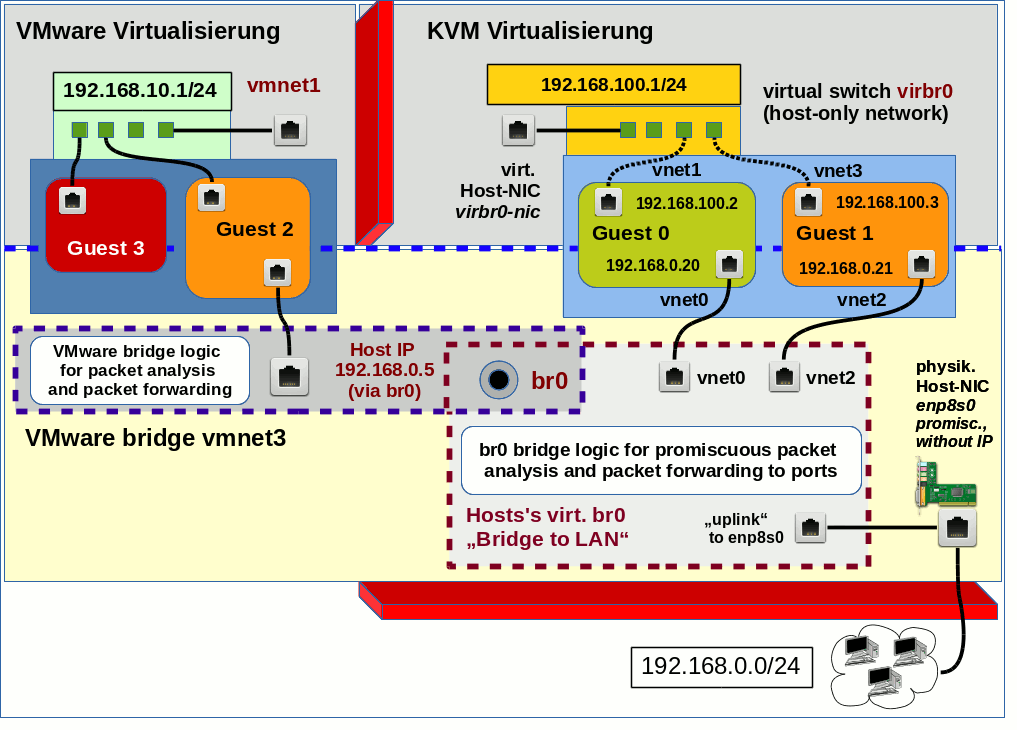
Bridge 设备实例可以和 Linux 上其他网络设备实例连接。attach 一个从设备,类似于在现实世界中的交换机和一个用户终端之间连接一根网线。当有数据到达时,Bridge 会根据报文中的 MAC 信息进行广播、转发、丢弃处理。 (当一个设备attach到bridge上时,该设备上的IP则变为无效,Linux不在使用那个IP在三层接受数据。此时应该把该设备的IP赋值给bridge设备。)
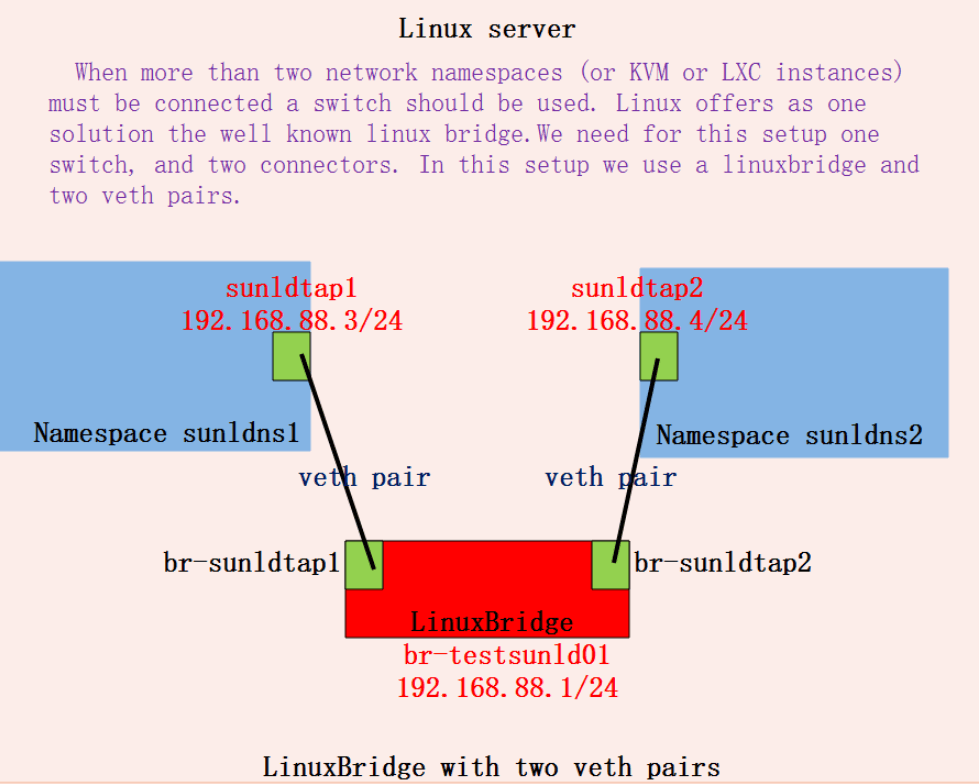
bridge的一个作用是在容器化环境联通不同network namespace:
brctl 命令
brctl是linux中操作网桥的命令。 首先安装brctl。
yum install bridge-utils -y
命令列表
[root@host143 ~]# brctl
Usage: brctl [commands]
commands:
# 增加/删除网桥
	addbr     	<bridge>		add bridge
	delbr     	<bridge>		delete bridge
# 绑定/解绑网卡
	addif     	<bridge> <device>	add interface to bridge
	delif     	<bridge> <device>	delete interface from bridge
# nat hairpin模式
	hairpin   	<bridge> <port> {on|off}	turn hairpin on/off
# mac地址老化时间,超过则从Forwarding DataBase删除
	setageing 	<bridge> <time>		set ageing time
	setbridgeprio	<bridge> <prio>		set bridge priority
	setfd     	<bridge> <time>		set bridge forward delay
	sethello  	<bridge> <time>		set hello time
	setmaxage 	<bridge> <time>		set max message age
	setpathcost	<bridge> <port> <cost>	set path cost
	setportprio	<bridge> <port> <prio>	set port priority
	show      	[ <bridge> ]		show a list of bridges
# 查看学习的mac地址,和老化时间
	showmacs  	<bridge>		show a list of mac addrs
	showstp   	<bridge>		show bridge stp info
	stp       	<bridge> {on|off}	turn stp on/off
aging
mac地址学习和mac老化。通过反复这样的学习,交换机会构建一个基于所有端口的转发数据库,存储在交换机的内容可寻址存储器当中(CAM)。
The bridge keeps track of ethernet addresses seen on each port. When it needs to forward a frame, and it happens to know on which port the destina‐ tion ethernet address (specified in the frame) is located, it can ‘cheat’ by forwarding the frame to that port only, thus saving a lot of redundant copies and transmits.
However, the ethernet address location data is not static data. Machines can move to other ports, network cards can be replaced (which changes the machine’s ethernet address), etc.
相关参数
showmacs:查看学习的mac地址和老化时间setageing:如果一定时间内都没有流量经过mac地址,则把这个地址从Forwarding DataBase删除。setgcint:设置brctl每N秒检查一次Forwarding DataBase。
[root@host143 ~]# brctl showmacs virbr0
port no	mac addr		is local?	ageing timer
  1	52:54:00:47:11:66	yes		   0.00
  1	52:54:00:47:11:66	yes		   0.00
如果aging设置为0,则退化为hub(因为不记录学习到的mac地址)。
stp
STP协议(生成树协议)逻辑上断开环路,防止二层网络的广播风暴的产生。 (TODO: 以后单独补充)
showstp可以看到所有相关参数。
root@host143 ~]# brctl showstp docker0
docker0
 bridge id		8000.0242a0f4db57
 designated root	8000.0242a0f4db57
 root port		   0			path cost		   0
 max age		  20.00			bridge max age		  20.00
 hello time		   2.00			bridge hello time	   2.00
 forward delay		  15.00			bridge forward delay	  15.00
 ageing time		 300.00
 hello timer		   0.00			tcn timer		   0.00
 topology change timer	   0.00			gc timer		 241.60
 flags
对比 桥接/交换/路由
桥接/交换工作在链路层(2层)。 路由工作在IP层(3层)。
路由划分的是独立的逻辑网段,每个所连接的网段都具有独立的网络IP地址信息,而不是以MAC地址作为判断路径的依据,这样路由便有隔离广播的能力。 (通过判断目的IP与自己端口的IP是否一致,不一致就丢掉这个包,广播风暴就不会影响到其他网络里,只在自己小范围的网络里进行传递) 而交换和桥接是划分物理网段,它们仅仅是将物理传输介质进行分段处理。