/proc/zoneinfo
zoneinfo能够看到看到内存使用的细节。 输出信息太多,这里只关注内存水位(watermark)。
[root@host143 ~]# cat /proc/zoneinfo
Node 0, zone      DMA
  pages free     3960
        min      16
        low      20
        high     24
        scanned  0
        spanned  4095
        present  3997
        managed  3976
    nr_free_pages 3960
    nr_alloc_batch 4
    nr_inactive_anon 0
    nr_active_anon 0
    nr_inactive_file 0
    nr_active_file 0
    nr_unevictable 0
    nr_mlock     0
    nr_anon_pages 0
    nr_mapped    0
    nr_file_pages 0
    nr_dirty     0
    nr_writeback 0
    nr_slab_reclaimable 0
    nr_slab_unreclaimable 16
    nr_page_table_pages 0
    nr_kernel_stack 0
    nr_unstable  0
    nr_bounce    0
    nr_vmscan_write 0
    nr_vmscan_immediate_reclaim 0
    nr_writeback_temp 0
    nr_isolated_anon 0
    nr_isolated_file 0
    nr_shmem     0
    nr_dirtied   0
    nr_written   0
    numa_hit     2
    numa_miss    0
    numa_foreign 0
    numa_interleave 0
    numa_local   2
    numa_other   0
    workingset_refault 0
    workingset_activate 0
    workingset_nodereclaim 0
    nr_anon_transparent_hugepages 0
    nr_free_cma  0
# 和 lowmem_reserve_ratio 有关
        protection: (0, 2830, 15850, 15850)
  pagesets
    cpu: 0
              count: 0
              high:  0
              batch: 1
  vm stats threshold: 6
    cpu: 1
              count: 0
              high:  0
              batch: 1
  vm stats threshold: 6
    cpu: 2
              count: 0
              high:  0
              batch: 1
  vm stats threshold: 6
    cpu: 3
              count: 0
              high:  0
              batch: 1
  vm stats threshold: 6
  all_unreclaimable: 0
  start_pfn:         1
  inactive_ratio:    1
linux内存使用水位方式控制:
low:当剩余内存慢慢减少,触到这个水位时,就会触发kswapd线程的内存回收。 min:如果剩余内存减少到触及这个水位,可认为内存严重不足,当前进程就会被堵住,kernel会直接在这个进程的进程上下文里面做内存回收(direct reclaim)。 high: 进行内存回收时,内存慢慢增加,触到这个水位时,就停止回收。
min下的内存是保留给内核使用的;当到达min,会触发内存的direct reclaim。
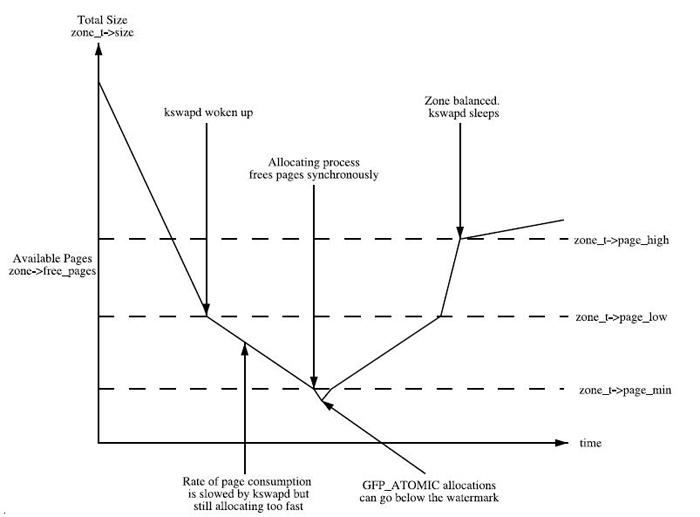
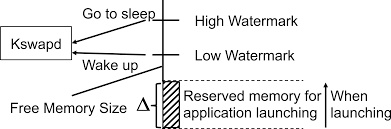
可以看到kswapd线程的工作区间是min和low之间。低于low启动,低于min触发direct reclaim。
每个ZONE都有这三个水位。
如果lowmem被使用殆尽,触及low或min水位,内核的普通kmalloc就申请不到内存了,就会触发cache/buffers的回收和匿名页swap,再不行就OOM了。
lowmen_reserve
So the Linux page allocator has a mechanism which prevents allocations which could use highmem from using too much lowmem. This means that a certain amount of lowmem is defended from the possibility of being captured into pinned user memory. The `lowmem_reserve_ratio’ tunable determines how aggressive the kernel is in defending these lower zones.
lowmem_reserve是给更高位的zones预留的内存,作用是防止高端zone在没内存的情况下过度使用低端zone的内存资源。。
[root@host143 ~]# cat /proc/sys/vm/lowmem_reserve_ratio
256	256	32
zone[i]’s protection[j] is calculated by following expression.
(i < j):
  zone[i]->protection[j]
  = (total sums of managed_pages from zone[i+1] to zone[j] on the node)
    / lowmem_reserve_ratio[i];
(i = j):
   (should not be protected. = 0;
(i > j):
   (not necessary, but looks 0)
The default values of lowmem_reserve_ratio[i] are 256 (if zone[i] means DMA or DMA32 zone) 32 (others). 预留内存值是ratio的倒数关系。
/proc/sys/vm/min_free_kbytes
vm.min_free_kbytes可以调节watermark[min]。
内核对min_free_kbytes的解释如下:
This is used to force the Linux VM to keep a minimum number of kilobytes free. The VM uses this number to compute a watermark[WMARK_MIN] value for each lowmem zone in the system. Each lowmem zone gets a number of reserved free pages based proportionally on its size. Some minimal amount of memory is needed to satisfy PF_MEMALLOC allocations; if you set this to lower than 1024KB, your system will become subtly broken, and prone to deadlock under high loads. Setting this too high will OOM your machine instantly.
划重点:不要随便调大min_free_kbytes,容易导致OOM。
初始化条件,总的"min"值约等于所有zones可用内存的总和乘以16再开平方的大小,同时设有min和max的阈值。
int __meminit init_per_zone_wmark_min(void)
{
	min_free_kbytes = int_sqrt(lowmem_kbytes * 16);

	if (min_free_kbytes < 128)
	    min_free_kbytes = 128;
	if (min_free_kbytes > 65536)
	    min_free_kbytes = 65536;
       ...
}
/proc/sys/vm/swapness
TODO