小程序用户协议页面设计思路
- 新增用户协议页面
- 首页加载(
onLoad())的时候,检查是否已经同意过,没有的话则弹出用户协议界面。点击详情跳转到用户协议页面(使用wx.navigateTo) - 用户点击同意后,才能继续使用小程序,并且保存到storage
效果图如下
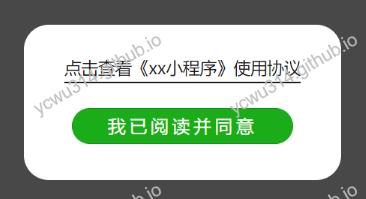
控制显示用户协议窗口
在首页新增一个view,根据全局userAgree的值,决定是否显示弹窗
<view wx:if='{{userAgree==false}}'>
  <view catchtouchmove="catchtouchmove" class="tips">
    <view class="tips_box">
      <view class="hint_view">
        <view class="text">
          <view class="hint1" bindtap='goToUserLicence'>点击查看《xx小程序》使用协议</view>
        </view>
      </view>
      <button bindtap='tipAgree' class="agreeBtn" type='primary'>我已阅读并同意</button>
    </view>
  </view>
</view>
因此要在首页增加一个全局变量
// 用户协议
var userAgree = false
更新onLoad()事件从storage读取userAgree字段
var that = this
var userAgree = wx.getStorageSync('userAgree') || false
that.setData({
    userAgree
})
因为用户协议很长,因此点击查看会导航到另一个页面
goToUserLicence: function(){
  wx.navigateTo({
    url: '/pages/licence/licence',
    success: function(res) {},
    fail: function(res) {},
    complete: function(res) {},
  })
}
首页用户协议弹窗用到的css
.tips {
    display: flex;
    justify-content: center;
    align-items: center;
    position: fixed;
    left: 0;
    top: 0;
    z-index: 100;
    width: 100%;
    height: 100%;
    background: rgba(0,0,0,0.7);
}

.tips .tips_box {
    display: flex;
    flex-direction: column;
    align-items: center;
    width: 75%;
    height: auto;
    border-radius: 45rpx;
    background: #fff;
    overflow: hidden;
}

.tips .tips_box .hint_view {
    display: flex;
    align-items: center;
}

.tips .tips_box .hint_view .text {
    display: flex;
    flex-direction: column;
    margin: 12rpx 24rpx;
}

.tips .tips_box .hint1 {
    margin-top: 38rpx;
    text-align: center;
    font-size: 30rpx;
    color: #1a1a1a;
    line-height:52rpx;
    border-bottom:1px solid;
}

.agreeBtn {
    display: flex;
    justify-content: center;
    align-items: center;
    margin: 32rpx 0 32px;
    width: 70%;
    line-height: 64rpx;
    border-radius: 80rpx;
    font-size: 32rpx;
    letter-spacing: 6rpx;
    color: #fff;
}
.isTipShow {
  display: block;
}

.isTipHide {
  display: none;
}
用户协议页面设计
作为Java后端架构汪,写起前端页面也就hehehe的水平,仅供参考。 css在线调试,用到这个工具 https://tool.chinaz.com/tools/cssdesigner.aspx
licence.wxml
<view>
  <view class='title'>用户授权协议</view>

  <view class='h1'>使用条款及声明</view>
  <view>
    xxx
  </view>

  <view class='h1'>小程序用途</view>
  <view>
    yyy
  </view>
<view>
licence.wxss
/* pages/licence/licence.wxss */

.title {
  text-align: center;
  font-size: 20pt;
  font-weight : bold;
  margin: 20px;
}

.h1 {
  text-align: left;
  font-size: 16pt;
  margin: 10px;
}