配置k3s + helm + rancher + containerd。
安装containerd
containerd是新一代的容器运行时,新版的kubernetes使用它来替换docker。
https://github.com/containerd/containerd/blob/main/docs/getting-started.md
sudo -s

# install containerd
wget https://github.com/containerd/containerd/releases/download/v1.6.4/containerd-1.6.4-linux-amd64.tar.gz
tar xvf containerd-1.6.4-linux-amd64.tar.gz

# install runc
wget https://github.com/opencontainers/runc/releases/download/v1.1.2/runc.amd64 -O runc.amd64
install -m 755 runc.amd64 /usr/local/sbin/runc


# install cni plugin
wget https://github.com/containernetworking/plugins/releases/download/v1.1.1/cni-plugins-linux-amd64-v1.1.1.tgz -O cni-plugins-linux-amd64-v1.1.1.tgz

mkdir -p /opt/cni/bin
tar Cxzvf /opt/cni/bin cni-plugins-linux-amd64-v1.1.1.tgz
可以把containerd安装为systemd service:
# install systemd service
mkdir -p /usr/local/lib/systemd/system
vi /usr/local/lib/systemd/system/containerd.service
文件内容为:
[Unit]
Description=containerd container runtime
Documentation=https://containerd.io
After=network.target local-fs.target

[Service]
ExecStartPre=-/sbin/modprobe overlay
ExecStart=/usr/local/bin/containerd

Type=notify
Delegate=yes
KillMode=process
Restart=always
RestartSec=5
# Having non-zero Limit*s causes performance problems due to accounting overhead
# in the kernel. We recommend using cgroups to do container-local accounting.
LimitNPROC=infinity
LimitCORE=infinity
LimitNOFILE=infinity
# Comment TasksMax if your systemd version does not supports it.
# Only systemd 226 and above support this version.
TasksMax=infinity
OOMScoreAdjust=-999

[Install]
WantedBy=multi-user.target
安装k3s
k3s是符合kubernetes规范的、轻量级实现。相比原来的kubernetes,更加节省资源。
k3s server
k3s-install.sh安装脚本自动创建systemd k3s.service。
sudo -s

mkdir k3s
cd k3s
wget https://rancher-mirror.rancher.cn/k3s/k3s-install.sh -O k3s-install.sh
chmod u+x k3s-install.sh
wget https://rancher-mirror.rancher.cn/k3s/v1.23.6-k3s1/k3s-airgap-images-amd64.tar -O k3s-airgap-images-amd64.tar
wget https://rancher-mirror.rancher.cn/k3s/v1.23.6-k3s1/k3s -O k3s
cp k3s /usr/local/bin/


mkdir -p /var/lib/rancher/k3s/agent/images
cp k3s-airgap-images-amd64.tar /var/lib/rancher/k3s/agent/images

INSTALL_K3S_SKIP_DOWNLOAD=true ./k3s-install.sh
一些安装选项说明:
- INSTALL_K3S_SKIP_DOWNLOAD=true 不去下载k3s可执行文件
- INSTALL_K3S_EXEC="–write-kubeconfig ~/.kube/config –write-kubeconfig-mode 666"
--write-kubeconfig:安装时写入Kubeconfig文件,方便使用kubectl工具直接访问。 如果不加此参数,则默认的配置文件路径为/etc/rancher/k3s/k3s.yaml,默认只有root用户能读。--docker:使用docker而不是默认的containerd
k3s server节点安装时,可以选在同时在本地安装一个k3s Agent节点用以承载工作负载,如果选择不在Server节点上安装Agent节点,则除了k3s集成的Kubernetes组件(如kubelet、API Server)之外,其余的插件、应用均不会被调度到Server节点上。
k3s agent
在server节点上,获取token:
# cat /var/lib/rancher/k3s/server/node-token
K10094cb6c9fda53c4ca8b0ffe68ee01c4991bf47a51eaa9390f7f71856a9afcd91::server:f1c41d741af770b5f8b5b634ecd50a19
在agent节点执行下面的命令安装k3s-agent节点。
sudo -s

# k3s agent \
--server https://<k3s_master_node_ip>:6443 \
--token K10094cb6c9fda53c4ca8b0ffe68ee01c4991bf47a51eaa9390f7f71856a9afcd91::server:f1c41d741af770b5f8b5b634ecd50a19 \
--node-label asrole=worker
参数说明:
- –server:k3s server节点监听的url,必选参数。
- –token:k3s server安装时生成的token,必选参数。
- –node-label:同样给k3s agent节点打上一个asrole=worker的标签,非必选参数。
安装helm
helm是kubernetes上的应用管理工具。
https://helm.sh/docs/intro/install/
sudo -s
wget https://get.helm.sh/helm-v3.9.0-linux-amd64.tar.gz -O helm-v3.9.0-linux-amd64.tar.gz
cp linux-amd64/helm /usr/local/bin/helm
安装rancher
rancher提供了可视化界面,方便管理kubernetes。 rancher支持单独容器方式运行,或者运行在托管的kubernetes集群。 rancher强制要求使用TLS方式访问,先简单了解rancher对证书的支持。
rancher和TLS证书
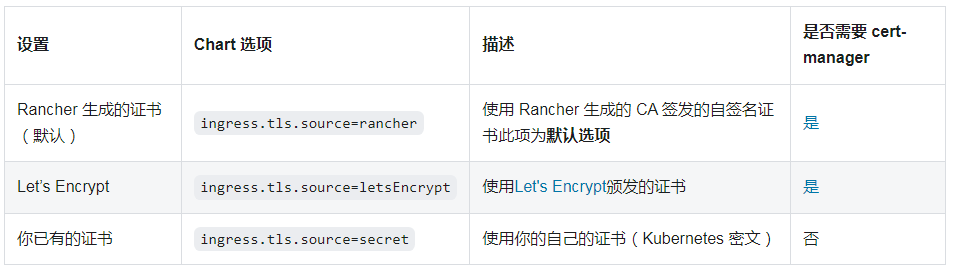
Rancher Server 默认需要 SSL/TLS 配置来保证访问的安全性。 你可以从以下三种证书来源中选择一种,证书将用来在 Rancher Server 中终止 TLS:
- Rancher 生成的 TLS 证书: 在这种情况下,你需要在集群中安装 cert-manager。 Rancher 利用 cert-manager 签发并维护证书。Rancher 将生成自己的 CA 证书,并使用该 CA 签署证书。然后 cert-manager 负责管理该证书。
- Let’s Encrypt: Let’s Encrypt 选项也需要使用 cert-manager。但是,在这种情况下,cert-manager 与 Let’s Encrypt 的特殊颁发者相结合,该颁发者执行获取 Let’s Encrypt 颁发的证书所需的所有操作(包括请求和验证)。此配置使用 HTTP 验证(HTTP-01),因此负载均衡器必须具有可以从公网访问的公共 DNS 记录。
- 使用你已有的证书: 此选项使你可以使用自己的权威 CA 颁发的证书或自签名 CA 证书。 Rancher 将使用该证书来保护 WebSocket 和 HTTPS 流量。在这种情况下,你必须上传名称分别为tls.crt和tls.key的 PEM 格式的证书以及相关的密钥。如果使用私有 CA,则还必须上传该 CA 证书。这是由于你的节点可能不信任此私有 CA。 Rancher 将获取该 CA 证书,并从中生成一个校验和,各种 Rancher 组件将使用该校验和来验证其与 Rancher 的连接。
官网资料:
- https://rancher.com/docs/rancher/v2.6/en/installation/resources/custom-ca-root-certificate/
- https://rancher.com/docs/rancher/v2.6/en/installation/install-rancher-on-k8s/chart-options/#additional-trusted-cas
docker方式
使用rancher的自签名证书:
# -p: 物理端口:容器端口
sudo -s
docker run -d --restart=unless-stopped --privileged=true -p 80:80 -p 443:443 --name rancher rancher/rancher
需要使用--privileged选项,使用特权模式启动docker镜像:
It allows our Docker containers to access all devices (that is under the /dev folder) attached to the host as a container is not allowed to access any devices due to security reasons.
否则报错:
ERROR: Rancher must be ran with the –privileged flag when running outside of Kubernetes
Linux 引入了 capabilities 机制对 root 权限进行细粒度的控制,实现按需授权,从而减小系统的安全攻击面。
man capabilities
可以看到详细介绍。
在docker中,使用--cap-add和--cap-drop进行细粒度控制权限。
参考官方的docker安装方式: https://rancher.com/docs/rancher/v2.5/en/installation/other-installation-methods/single-node-docker/
helm方式
使用rancher生成TLS证书。
sudo -s

# 安装cert-manager
helm repo add jetstack https://charts.jetstack.io
helm repo update
kubectl apply --validate=false -f https://github.com/jetstack/cert-manager/releases/download/v1.8.0/cert-manager.crds.yaml
kubectl create namespace cert-manager
helm install  cert-manager jetstack/cert-manager --namespace cert-manager --version v1.8.0

# 安装rancher
helm repo add rancher-stable http://rancher-mirror.oss-cn-beijing.aliyuncs.com/server-charts/stable
helm repo update
# 让rancher运行在单独的namespace
kubectl create namespace cattle-system

# 解决 Kubernetes cluster unreachable 问题
export KUBECONFIG=/etc/rancher/k3s/k3s.yaml
helm install rancher rancher-stable/rancher   --namespace cattle-system   --set hostname=rancher.ycwu.com
rancher默认TLS cert策略是--set ingress.tls.source=rancher,可以省略。
--set hostname指定DNS域名。没有域名的话,自己捏一个,然后修改hosts文件。
漫长等待,直至pods都running
root@zj-desktop:/home/zj# kubectl get pods --namespace cattle-system
NAME                               READY   STATUS    RESTARTS   AGE
rancher-7bd5d865df-phks7           1/1     Running   0          149m
rancher-7bd5d865df-56j5c           1/1     Running   0          149m
rancher-7bd5d865df-k2825           1/1     Running   0          149m
rancher-webhook-5b65595df9-kqrjv   1/1     Running   0          147m
如果发生错误,需要排查日志
root@zj-desktop:/home/zj/k3s# kubectl describe pods -n cattle-system rancher-554cfb8646-n6hff

Events:
  Type     Reason       Age                  From               Message
  ----     ------       ----                 ----               -------
  Normal   Scheduled    16m                  default-scheduler  Successfully assigned cattle-system/rancher-554cfb8646-n6hff to zj-desktop
  Warning  FailedMount  100s (x15 over 16m)  kubelet            MountVolume.SetUp failed for volume "tls-ca-volume" : secret "tls-ca" not found
  Warning  FailedMount  24s (x7 over 13m)    kubelet            Unable to attach or mount volumes: unmounted volumes=[tls-ca-volume], unattached volumes=[tls-ca-volume kube-api-access-nt8pj]: timed out waiting for the condition
如果要清除rancher
helm delete rancher -n cattle-system
helm安装rancher问题
问题
root@zj-desktop:/home/zj/k3s# helm install rancher rancher-stable/rancher   --namespace cattle-system   --set hostname=rancher.ycwu.com   --set ingress.tls.source=secret   --set privateCA=true
Error: INSTALLATION FAILED: Kubernetes cluster unreachable: Get "http://localhost:8080/version": dial tcp 127.0.0.1:8080: connect: connection refused
原因是helm找不到k3s。解决导出KUBECONFIG环境变量:
export KUBECONFIG=/etc/rancher/k3s/k3s.yaml
helm install rancher rancher-stable/rancher   --namespace cattle-system   --set hostname=rancher.ycwu.com
访问rancher
hosts文件添加
10.34.18.68 rancher.ycwu.com
然后访问https://rancher.ycwu.com(必须https)。
第一次访问rancher,提示输入密码:
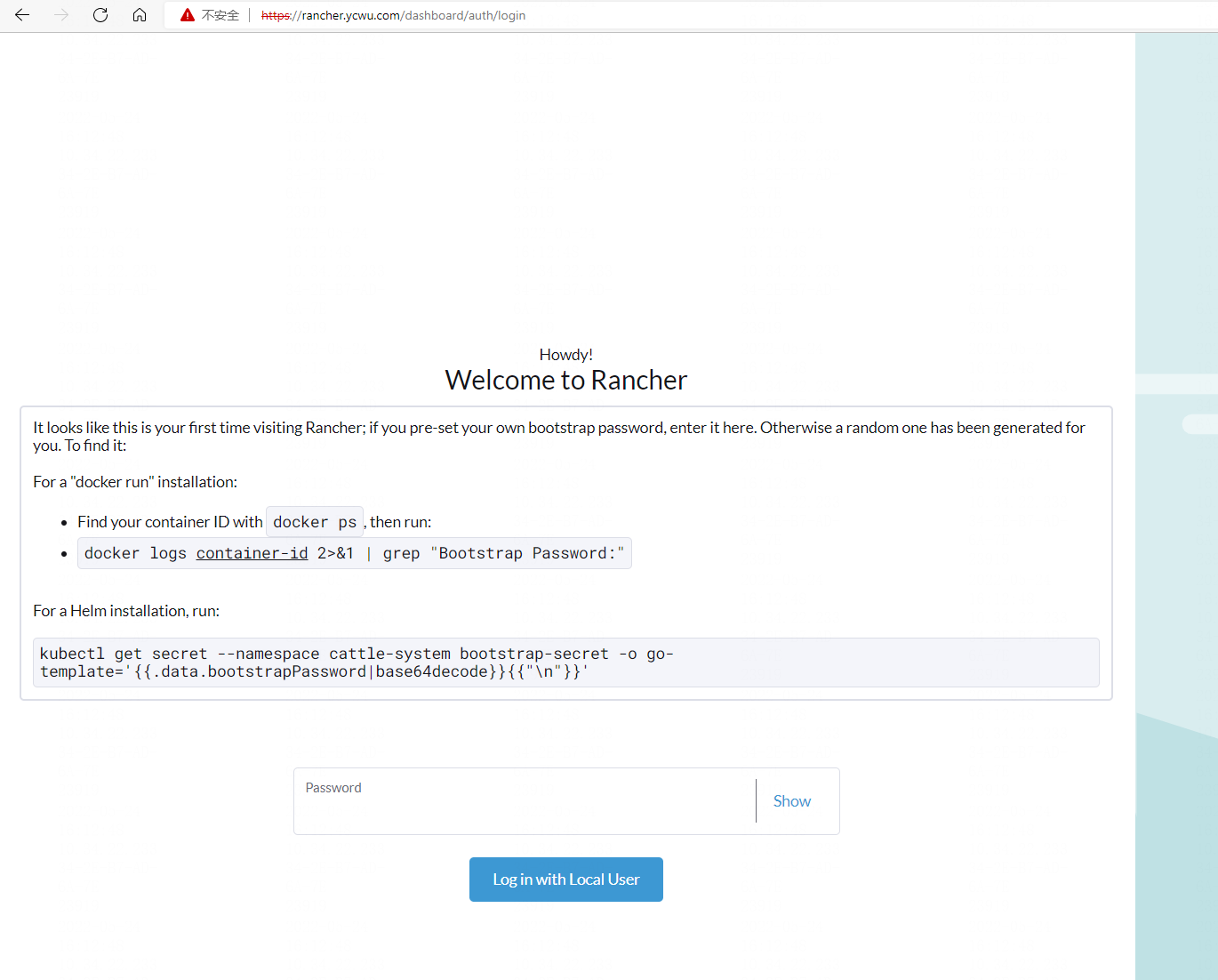
可能遇到rancher初始化密码问题:
root@zj-desktop:/home/zj# kubectl get secret --namespace cattle-system bootstrap-secret -o go-template='{{.data.bootstrapPassword|base64decode}}{{ "\n" }}'
Error from server (NotFound): secrets "bootstrap-secret" not found
https://github.com/rancher/rancher/issues/34686
解决方法:
- helm安装rancher时指定密码:
--set bootstrapPassword=**** - 或者,直接向rancher pod发送
-- reset-password
root@zj-desktop:/home/zj# kubectl -n cattle-system exec $(kubectl -n cattle-system get pods -l app=rancher | grep '1/1' | head -1 | awk '{ print $1 }') -- reset-password
W0524 10:42:57.454559     410 client_config.go:617] Neither --kubeconfig nor --master was specified.  Using the inClusterConfig.  This might not work.
New password for default admin user (user-rtczg):
Po7pEqM7rigkWi_YTHCC
后续使用rancher管理k3s集群。
参考资料
https://rancher.com/docs/rancher/v2.5/en/installation/resources/troubleshooting/